From daily agency practice

Your SEO tools tell you what to do.
This is where you do it.

From analysis to briefing to the published page - all in one environment. It belongs to you, runs in your own accounts and adapts through Claude Code. Your data sources stay exactly as they are.
One-time price. No subscription. Runs in your accounts, on your machine.

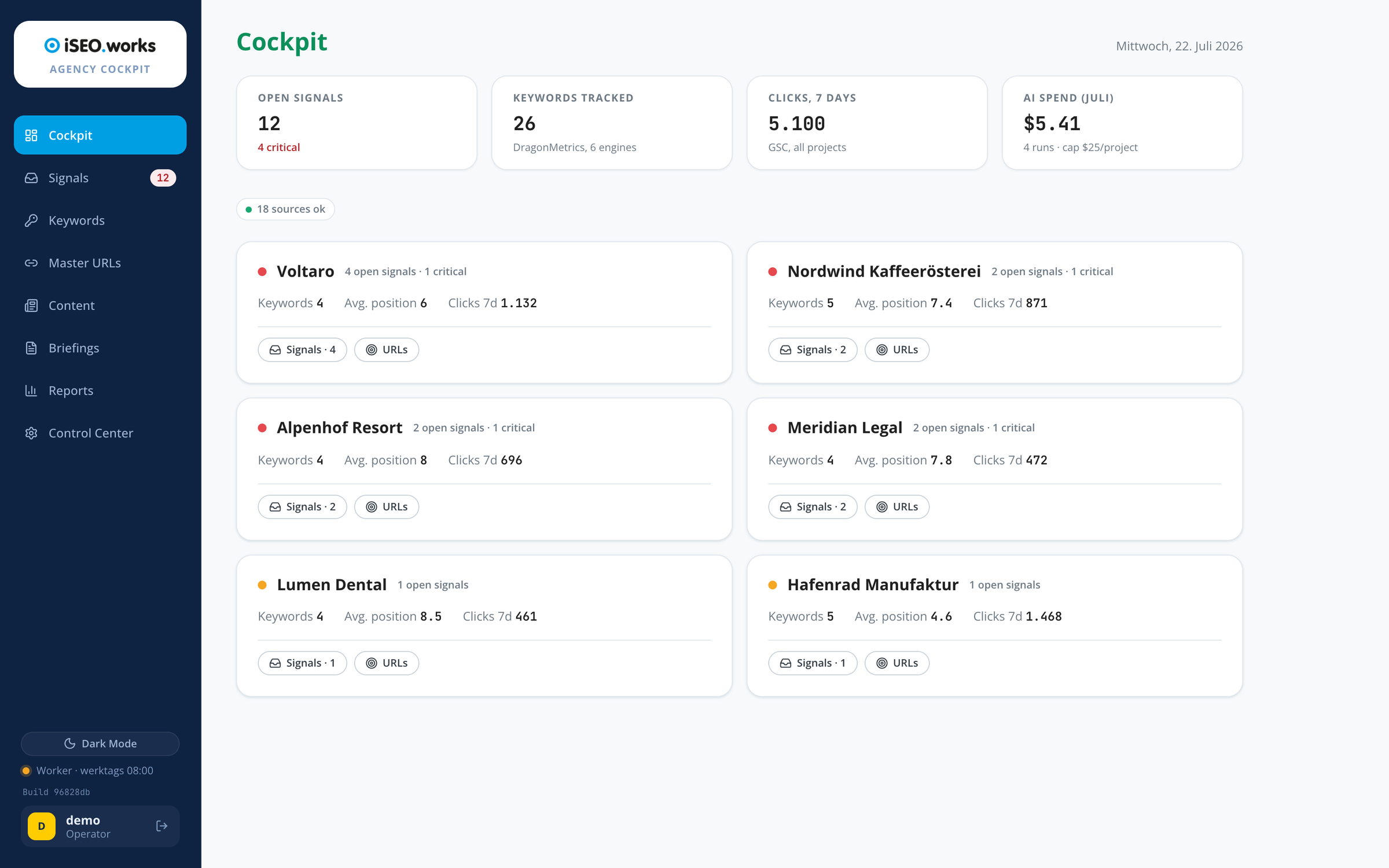
Cockpit · all projects at a glance
RankCockpit overview: open signals, tracked keywords, clicks and AI spend, plus every client project with its signals and positions at a glance ⤢ Enlarge

Real view from the system · demo projects · click to enlarge
The gap

Measuring is solved. Doing is not.

Plenty of data, no priorities

Rank trackers, Search Console, Analytics: every tool delivers numbers, none of them tells you which ones matter today or what to do about them. The diagnosis stays manual work - every day, for every project.

Nobody is watching AI search

ChatGPT, Perplexity and AI Overviews have been recommending brands and products for a while now. Whether yours is among them is something your classic SEO setup does not measure. Visibility is shifting - and without measurement you notice only when the inquiries stop coming.

You could build the system for this yourself. Budget hundreds of hours of development.
Or you take over one that already runs.

What is inside

Eight modules. One for every step of the work.

RankCockpit is not one feature but eight interlocking modules - each one grown out of real agency work, not out of a pitch deck. From the analysis to the action taken, you stay in one environment.

Signals & analysis agent

Every working day RankCockpit checks rankings, clicks and AI visibility across all projects and reports prioritized signals - from a ranking drop to a lost ChatGPT recommendation, weighted by revenue relevance. At the push of a button the analysis agent researches the root cause with evidence and delivers actions with effort and impact. In daily practice that means you open one inbox in the morning instead of five tools - and you know what matters today.

Learn more →

Keyword research

Harvests real Google data and lets an LLM judge cut ruthlessly. A run harvests several hundred candidates; what remains is a few dozen clusters with substance - classified as money or blog clusters, with priority, difficulty and a ready title and structure proposal. The work is not in the collecting, it is in the throwing away. A run costs one to two dollars and gives you a working basis that leads straight into the briefing.

Learn more →

Content pipeline

A kanban board carries every piece of content from idea through draft and review to published - blog articles and LinkedIn posts on the same board, with a built-in editor. Auto-publish ships on the cadence you choose. In daily practice: your projects keep their publishing frequency without you having to think about it every day - and nothing goes live that you have not approved.

Learn more →

SEO briefings

Project, target URL, focus keyword - one click: a complete page briefing appears as a Google Doc in your Drive, based on the project's real data and written in your style. Cost: under a dollar. In daily practice it replaces the hour you would otherwise spend assembling structure, keywords and competitor notes by hand - from signal to writer briefing in minutes.

Learn more →

Focus URLs

The page register lists every target URL with its focus keyword and live data - position, volume, impressions, clicks - from rank tracking and Search Console. Built-in cannibalization protection warns you before two of your own pages start pushing each other out. In daily practice: before you plan a new page, the register tells you whether it will get in the way of an existing one.

Learn more →

Reporting

One click produces a monthly report per client: a plain-language summary, the numbers, what was implemented, the outlook - AI visibility included. You review and approve; only then does the client see it. In daily practice this turns the end-of-month reporting marathon into half an hour of reviewing and approving.

Learn more →

Control Center & prompts

Every prompt in the system is editable, every LLM selectable - globally or per client, billed transparently through OpenRouter. This is where your own preferences, hard-won lessons and tricks move into the system: the cockpit does not work like some generic tool, it works like you. No black-box feeling, no hidden prompts.

Learn more →

Multi-client setup

Every client gets their own login with their own content section - feature switches let you control what they see and what they may do, right down to their own prompts and their own LLM per client. White-label from the start. In daily practice: your client works inside their own area without ever seeing your cockpit or any other client.

Learn more →
Integrations

Your data sources sit in the background. The work lives here.

Every source sits behind an adapter layer: Google Search Console, GA4, DragonMetrics, Rankscale, DataForSEO and Google Docs deliver data today, and if you use other tools you swap the connector with Claude Code. The principle: any system Claude Code can reach through an MCP server or an API can be connected.

How integrations work →

The difference

What you actually buy: practice, cast into code

Anyone with enough time could build the code. What you cannot quickly rebuild are the decisions inside it - grown out of many years of international SEO and GEO work:

  • Field-tested thresholds instead of default alerts - signals fire when it matters, not at every twitch.
  • Flap protection against signal noise - no flood of alerts from measurement wobble.
  • Cannibalization protection - a URL-to-keyword register warns you before your own pages start displacing each other.
  • Business weighting - signals on revenue-relevant pages count for more than those on side pages, based on GA4.
  • Agent prompts from practice - the analysis agent thinks like an SEO consultant, not like a chatbot.
  • Honest impact checks - the system does not claim results, it measures them afterwards.

This is not a feature list from a pitch deck. It is the working method of an agency that uses it every day.

The handover

It runs in your accounts. Nothing depends on us.

No cloud of ours, no vendor lock-in. You get the complete system and run it yourself - your Claude Code handles the technical work.

1

Repo handover

You receive your private copy of the complete system: code, setup documentation and the operator handbook.

2

Claude Code installs it

You open the folder in Claude Code and say "install me." Your Claude works through the included runbook step by step.

3

Your accounts, your keys

Database, hosting, Google access, AI models: everything runs in your own accounts. Your data never leaves your control.

4

The daily run

Every working day in the morning: data sync, signal engine, digest. On your machine - or later in the cloud, the migration guide is included.

Your tool

Do not operate it. Brief it.

RankCockpit is built for working with Claude Code - installed, steered and extended in conversation. Concretely that means:

  • Adjust: thresholds, prompts, your own signal rules - you describe it, your Claude implements it.
  • Extend: new data sources connect through the adapter layer - Ahrefs, Semrush and others by swapping a connector, without rebuilding the system.
  • Understand: your Claude knows the system and explains every part of it to you. No black-box feeling.

// You, in Claude Code:

> Add a signal rule: warn me when a product page loses clicks three days in a row.

// Your Claude: creates the rule, tests it - from tomorrow it is part of the daily run. Your system.

Honesty instead of voodoo

What RankCockpit is not

The market is full of auto-SEO magic that disappoints. So we would rather tell you up front what you do not get:

  • No auto-SEO and no ranking guarantee. The system makes you faster and more precise - it does not replace your judgment.
  • No cloud operated by us: you need your own accounts and API access (database, Google, AI models). The setup is guided.
  • Mac-first today: your machine is the engine. Moving to the cloud is documented; native Windows support is not there yet.
  • No SLA, no support subscription: it is yours, with everything that comes with that. Two hours of onboarding and 12 months of maintenance updates are included.
  • Single license: use for yourself and your clients is expressly permitted - reselling and passing it on is not.

If you are looking for a magic tool, RankCockpit is not for you.
If you want a professional instrument, you are in the right place.

In use

Every working day in a real agency

RankCockpit is not a concept. It is the instrument an international SEO agency uses to look after its client projects. Three real findings from practice:

0 / 61

One client was completely invisible in AI answers: zero hits across 61 measured queries, while competitors were being recommended. No classic tool had reported it.

Pos. 2 → 14

A ranking drop on a revenue-relevant keyword, caught on day one. The agent diagnosed core-update volatility - with evidence and proof of recovery instead of panic.

8 × cannibalization

Eight pairs of pages pushing each other out of the rankings - uncovered on the first day after a project's Search Console was connected.

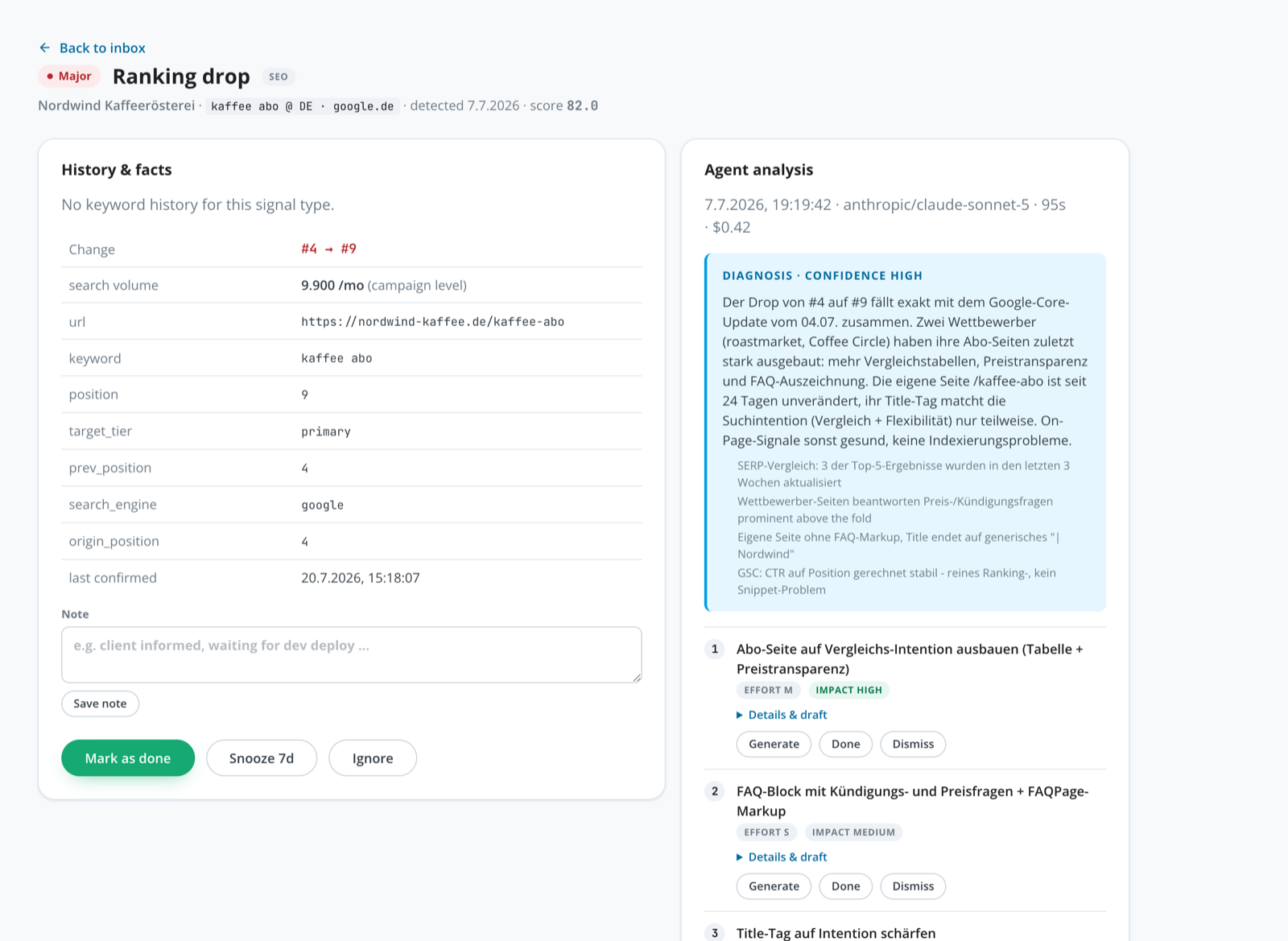
Signal detail · agent analysis
Signal detail with agent analysis: high-confidence diagnosis, evidence from SERP comparison and GSC, prioritized actions with effort and impact

This is what an agent analysis looks like: diagnosis with evidence, prioritized actions with effort and impact · demo project

Is this for you?

Who RankCockpit is built for

You are in the right place as a

  • Solo SEO or freelancer - look after several projects without checking five tools every morning.
  • In-house SEO manager - a system that tells you where to look today and delivers the briefings with it.
  • Agency - multi-client, with client logins and feature switches per client.
  • Claude Code user - or willing to become one. You do not need to know how to code.

Not for you if you

  • expect a done-for-you tool that "does SEO automatically"
  • have enterprise requirements: SLA, uptime guarantees, dedicated support
  • strictly need native Windows (today: Mac-first)
  • do not want to set up your own accounts and API access
Pricing

Three ways into the same cockpit

The price depends on how many people work with it - not on which features you get. Those are the same at every tier.

Freelancer

Up to 3 people

€1,790

one-time · plus VAT · no subscription

  • The complete system as a private repo copy
  • Setup docs and operator handbook for Claude Code
  • Two hours of live onboarding with the developer
  • 12 months of updates (maintenance & compatibility)
  • Use for your clients expressly permitted
Get RankCockpit

Agency

4 people and up

from €3,900

one-time · plus VAT · fixed price by team size

  • Identical system - same repo copy, same modules
  • Team license for everyone at your agency
  • Four hours of onboarding - team setup, several clients, more sources
  • 12 months of updates (maintenance & compatibility)
  • Use for your clients expressly permitted
Book a call

Custom

Your own stack, several brands

On request

fixed price after a scoping call

  • Everything in the agency tier, plus:
  • Custom adapters for your data sources and systems
  • Migration of existing data from your current setup
  • Training for a larger team instead of individual onboarding
  • After that it belongs to you too - no maintenance contract
Scoping call

Every tier gives you the same source code and the same eight modules. What differs is how many people the license covers and how much setup we do together. If you grow, you license up - without buying again.

Questions & answers

What buyers want to know

What do I need technically to run RankCockpit?

A Mac, Claude Code and your own accounts with the services the system runs on: a Postgres database (Supabase, the free tier is enough to start), static hosting (Netlify, free), AI access (OpenRouter) and your Google access (Search Console, optionally Analytics). Rank tracking and AI visibility services are optional extras - you can start with Search Console alone.

Do I need to know how to code?

No. Your Claude Code runs the setup from the included runbook, in conversation. You should be willing to work with Claude Code - that is writing, not programming. If you can code, extending it will still be easier for you.

What running costs should I expect?

In the reference setup with six projects: around $15 per month for the AI analyses, plus the free or entry-level plans from Supabase and Netlify depending on how far you scale. One agent analysis costs about $0.10. Optional services (rank tracking, AI visibility measurement) have their own pricing - you decide what to connect.

What happens when Google or another service changes its API?

For twelve months you get repo updates that absorb such changes, included. After that you decide: leave it running as it is, adapt it yourself (your Claude Code helps) or take an optional update package.

Can I use RankCockpit for my clients?

Yes, expressly. The system is built for multiple clients: separate projects, client logins with their own view, feature switches, and even individual prompts and AI models per client. Only reselling the system itself is excluded.

Why sell the system instead of renting it out as SaaS?

Because tools of this kind no longer need a subscription. Software you steer and extend with an AI agent is worth more when it belongs to you: no price increases, no waiting for features, no dependency on a vendor. We earn from handing over our groundwork, not from your monthly rent.

What happens after the purchase, concretely?

Within 24 hours you get the invitation to your private repo copy and we schedule the onboarding session. In those two hours we set everything up together: accounts, access, first data sync, first signals. After that your system runs by itself every working day.

I work on Windows - does that work?

As of today RankCockpit is developed and tested Mac-first. Running it on Windows through Docker is possible but not yet part of the guided setup. If you are on Windows, talk to us before buying - an honest answer is guaranteed.

UL
The maker

Built by someone who uses it every day

I am Udo Leinhaeuser. I have run an international SEO agency for over ten years and owned a translation company before that. I built RankCockpit for my own agency work because no tool on the market brought early warning, AI visibility and concrete actions together. It runs every working day for my client projects. Now I am handing it over to anyone who wants to work with it - every handover in person, with onboarding.

Hundreds of development hours. Skipped.

Take over a system that does real agency work every working day - and belongs to you from the handover on.

Get RankCockpit 15-minute demo